
Qlik Answers is only as good as your app. We show you the gaps.
Qlik Answers Readiness is a DI Squared accelerator. It interrogates your Qlik apps, finds the ambiguity, duplication, and poorly described objects, drafts suggested fixes for your operator to approve, and generates test questions appropriate to the app’s subject area so you can test Qlik Answers against them.
A composite score with sub-scores by category.
Issues ranked critical, high, medium, and info.
Your worst-scoring objects, worst first.
Current versus proposed, for your operator to approve.
Test questions matched to the app's subject area.
Clearly defined metadata is what Answers works from.
An app that is going to be used by Qlik Answers needs very clearly defined metadata. That is what lets Answers intelligently pick the correct objects within the app. Picking the correct objects is what gives a user a higher likelihood of a correct response. Ambiguity, duplication, and poorly described objects work against that. Those are the three things this tool goes looking for.
More than one right-looking object
Where several fields or master items could each plausibly match the same question, there's nothing in the metadata to settle which one belongs. The tool surfaces those objects as findings.
The same meaning, more than once
Duplicate and near-duplicate objects spread one business term across several places in an app. The tool flags them so your team can decide which one is the definition.
Nothing to go on
Empty descriptions, unlinked glossary terms, and missing vocabulary give Answers no business context to work from. The tool scores each of those categories separately.
We don't estimate readiness. We measure it.
Qlik Answers Readiness came out of our work with a customer whose Qlik apps weren’t ready to support Answers. Rather than guess at what needed cleaning up, we built something that interrogates the app itself, reading every field, master item, glossary term, and description Answers will see, then scores what it finds.
01 /
It interrogates the targeted app
Point it at a Qlik app and it inventories what Answers will actually work with: fields, master items, glossary terms, vocabulary, and app context, including the objects that exist but go unused.
02 /
It scores readiness, by category
A single readiness score, broken into sub-scores across fields, master items, glossary, vocabulary, and app context, so you can see which category is costing you the most points before you touch anything.
03 /
It files what's wrong as findings
Issues are filed as findings, rated critical, high, medium, or info, and tied to the object they came from. The coverage view ranks objects worst-first so remediation has an order to it.
04 /
It drafts the fix, your operator decides
Findings get suggested remediations, drafted by a language model and shown as current versus proposed. The operator approves, edits, regenerates, or rejects each one. Tenant writes happen only through an explicit action, and applied changes are recorded in a change audit.
05 /
It writes the test questions
It generates test questions appropriate to the subject area of the application, pinned as a set, so the operator can test Qlik Answers against them and score the responses instead of eyeballing them.
What it looks at
A score tells you where you stand. A test run tells you if the fix landed.
A report on its own doesn’t change anything. This carries through to a change your operator approved and a test run against the same questions, so you can see what moved and what didn’t.
Score and coverage
The dashboard gives you the composite score and where it's leaking. The coverage runbook lists every field and master item with its score, its gaps, whether it's used, and how many findings it carries.
In the tool → Engagement Dashboard, Findings, Coverage
Drafted remediations
Proposed fixes sit next to the current values so the difference is obvious. Approve, edit, regenerate, or reject each one, compile the approved set into a change plan, then apply it, with a .qvf backup you can export first.
In the tool → Remediations
Question sets and eval runs
A pinned set of questions covering aggregates, filtered aggregates, top and bottom N, and trends over time runs against Answers before and after. Results are scored pass, partial, or fail, with a transcript for the run.
In the tool → Questions, Eval Runs
Not sure whether your apps are the problem? That’s what the baseline run is for. We score the app as it stands and run the question set against it before changing anything, so the conversation starts with a number instead of an opinion.
Every finding, fix, and test run in one place
Screens below are from a demonstration engagement against a sample app, not a customer tenant.
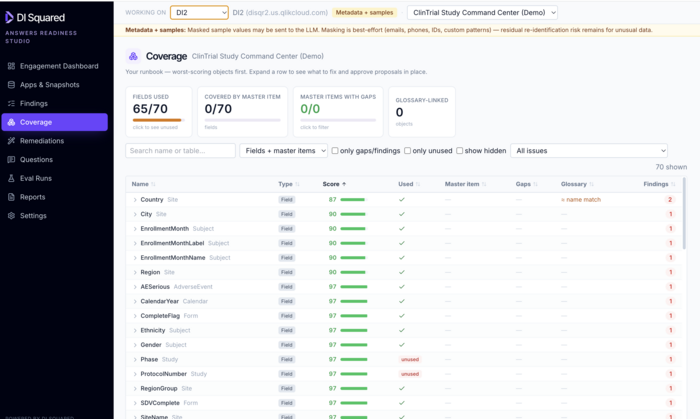
Coverage: your remediation runbook
Fields and master items in scope, scored and sorted worst-first, with what's used, what's unused, where the gaps are, and how many findings each object carries. Expand a row to see what to fix and approve the proposal in place.
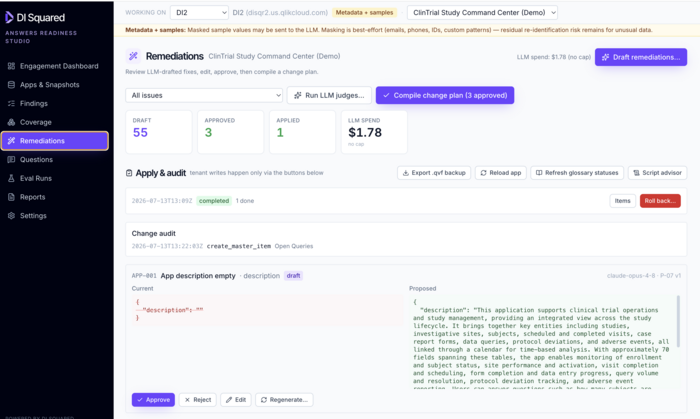
Remediations: current versus proposed
Language-model-drafted fixes with the existing value on the left and the proposal on the right. Approve, reject, edit, or regenerate each one. Approved items compile into a change plan; tenant writes happen only through the apply controls, and applied batches are logged with a roll-back option.
Coverage: your remediation runbook
Fields and master items in scope, scored and sorted worst-first, with what's used, what's unused, where the gaps are, and how many findings each object carries. Expand a row to see what to fix and approve the proposal in place.
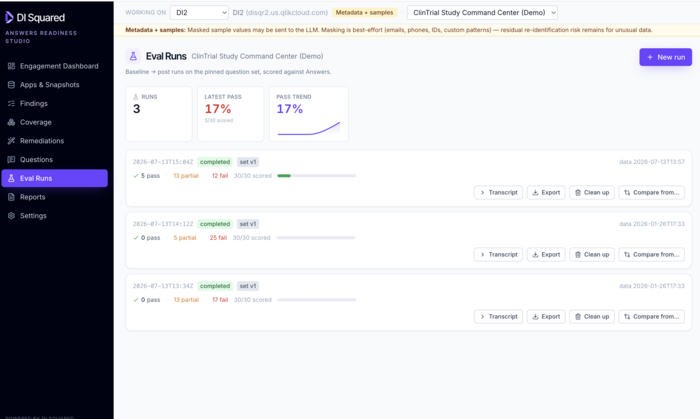
Eval Runs: before and after, side by side
Baseline and post runs against the pinned question set, scored pass, partial, or fail. Pass rates are tracked run over run, and each run has a transcript, an export, and a compare option against an earlier run.
Baseline it, fix it, run it again
Baseline
We snapshot the app, score it, and run the question set against Answers as it stands today. That number is what everything after gets measured against.
Remediate
We work the coverage runbook worst-first, reviewing drafted fixes alongside your team and applying only what your operator approves.
Re-test
The same question set runs again against the changed app. Pass rates are compared run over run, and the run transcript shows what still isn’t landing.
Hand off
The question set, the findings, and the change audit stay with the app, so your team can re-run the same check the next time the app changes.
Your operator approves writes
Proposals stay drafts. Tenant writes happen only through the apply controls, taken deliberately by an operator.
Changes are audited
Applied batches are recorded in a change audit with a timestamp, a .qvf backup you can export first, and a roll-back option.
Masking is stated, not assumed
Metadata and sample values are masked before being sent to the model. The tool says so in a persistent banner, and says just as plainly that masking is best-effort across emails, phones, IDs, and custom patterns, with residual re-identification risk for unusual data.
Model spend is on screen
Drafting and evaluation runs use a language model. Spend is displayed as you work, and whether a cap is set is shown alongside it.
Find out where your Qlik apps stand
Qlik Answers Readiness is offered as a value add and accelerator to DI Squared consulting agreements. Point it at an app and you’ll have a readiness score, a ranked list of what the tool found, drafted fixes for your operator to approve, and a question set to test Qlik Answers against.